


WeatherWise.app
4.3667.00 Reviews
App Specs
- Version
- 1.8.2
- Updated On
- License
- Free
- Downloads
- 500,000+
- Developer
- Interactive Weather
- Categories
- Weather
- Platform
- Android
Screenshots
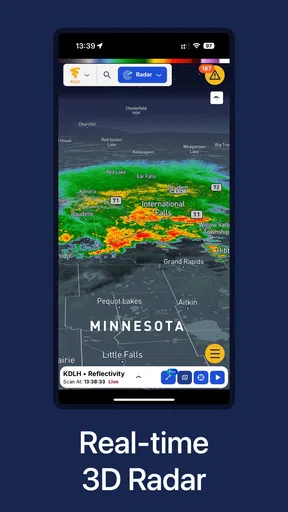
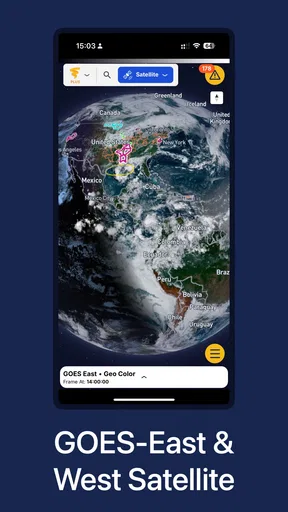
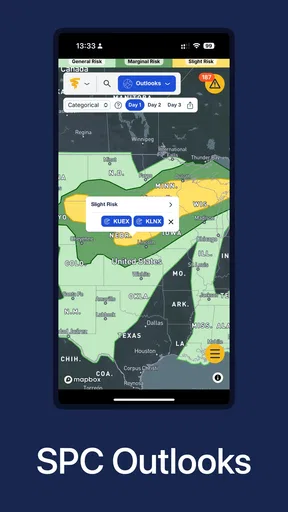
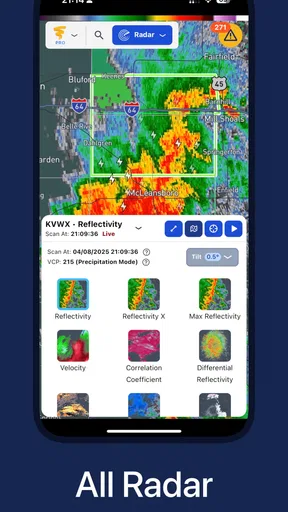
 Analysis by AppCompare
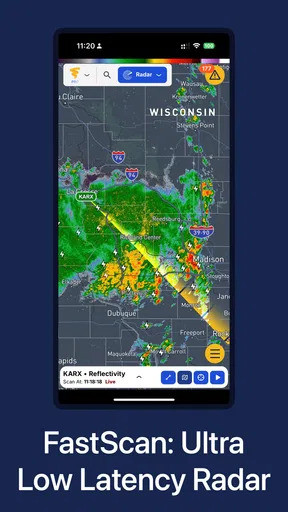
Weather apps have to earn my trust at the moments I need them most: when the sky is changing and I’m deciding whether to leave, wait, or change plans. WeatherWise.app is built around radar, so I see it as a tool for checking what may be moving through nearby rather than simply glancing at a temperature. That focus is useful, but it also sets a particular expectation: the app matters most when weather is changing, not when I only want a quick look at the day’s high.
What I expect when I open it
A radar view is only helpful if I can get to it without turning a simple check into a project. In ordinary use, I’d open WeatherWise.app to answer a practical question: does the rain look close enough to change my walk, commute, or errand? That is a different job from reading a broad daily forecast, and it’s where a radar-centered app can feel more direct than a general weather app full of summaries and extra panels.
I wouldn’t treat the word “real-time” as a promise that every image will appear instantly in every situation. Actual responsiveness can depend on the phone, the connection, and the amount of data being loaded. My sensible expectation is that the app is most useful when I have a stable connection and a moment to inspect the radar, rather than when I’m rushing out the door and need an answer in one glance.
Checking radar during busy weather
The most useful test is a day when plans depend on a narrow weather window. Imagine I’m about to walk to a bus stop, with groceries to collect afterward. Instead of checking only whether rain is forecast for the whole afternoon, I’d use radar to judge whether a shower appears to be approaching and whether waiting a little might make the trip more comfortable. I’d still keep a backup plan: radar helps me make a better decision, but it doesn’t make weather perfectly predictable.
For a longer outing, I’d check before leaving and again before heading back, especially if the route takes me away from shelter. That repeat check is a practical way to use a radar app without staring at it all day. It also keeps expectations realistic: a map can inform a choice, but I wouldn’t use one screen as the only basis for a safety decision during severe conditions.
Reliability is more than a fast first load
WeatherWise is from Interactive Weather, and its emphasis on detailed radar gives it a clear purpose. Still, I’d judge reliability by more than how quickly the first screen appears. I want an app to be understandable when I return to it after a few hours, and I want to be able to distinguish a useful radar picture from a reason to check official local guidance. For storms or other dangerous weather, the latter should take priority.
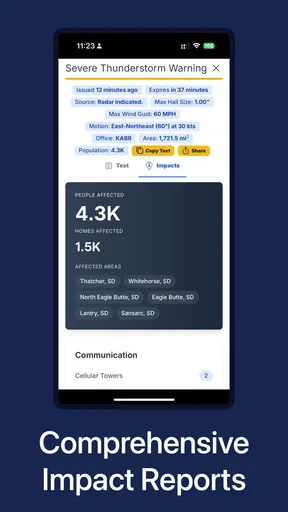
One limitation of radar-first checking is that it can encourage overconfidence. A visual map may look precise, but it is still a tool for interpreting conditions, not a guarantee about what will happen at one specific street or at one exact time. I’d use it to decide whether to carry a coat or postpone a casual walk; for travel or serious weather risks, I’d compare it with trusted local alerts rather than relying on a single app.
Worth Reading Before You Choose

EA SPORTS FC Mobile 26 Is a Bigger Football Game, but It Takes Time

Flipboard Shows What News Apps Must Do Beyond the Feed

Switching to Android Auto Means Rethinking Your Driving Routine

Google Calendar Makes a Crowded Week Easier to Manage

Ludo King Makes the Most of the Minutes Between Plans

Baby Panda World Brings Quick Play to Modern Phones, but Its Game Library Feels Busy
Devices, cost, and fit
The app is free to install and is rated for Everyone. It has an average rating of 4.2 from around 760 ratings, with more than 100,000 installs, so there is a meaningful base of users, though that alone can’t tell me whether its approach will suit every person. The current version is 1.4.1, and it requires Android 7.0 or later. That makes the Android requirement worth checking before installing on an older phone; a compatible operating system is a more useful starting point than assuming every handset will feel equally responsive.
There are in-app purchases, with items ranging from $1.99 to $159.99. I’d start with the free app and decide whether it already covers my everyday radar checks before spending anything. The range is broad enough that I would look carefully at what a particular purchase includes and whether I would use it regularly, rather than treating an optional purchase as a necessary part of getting started.
Compared with a standard weather app, WeatherWise makes more sense when I want to examine changing conditions on a map. If I only need a quick temperature, a simple forecast screen may be faster and less distracting. If I need to make a high-stakes decision, an app should not replace official warnings or local advice. The useful middle ground is everyday planning: use radar to refine a choice, then keep a practical alternative in mind.
Getting Started with WeatherWise
From the moment I installed WeatherWise.app, I was greeted with a clean and intuitive interface. No clutter, just straight-up weather info, which is a breath of fresh air if you ask me. Setting it up was a breeze. You simply allow it to access your location, and boom, you're good to go. It’s like having a mini meteorologist in your pocket.
User Interface and Experience
One of the things I instantly loved about the app is its vibrant yet simplistic design. The colors are easy on the eyes, which makes checking the weather a pleasant experience rather than a chore. The main screen displays current conditions upfront, with a neat little forecast for the next few days. What’s great is that it’s not just about numbers and icons; there’s a touch of personality with fun weather-related tips sprinkled in.
Navigation is straightforward. Whether you’re checking tomorrow’s forecast or planning a trip a week ahead, everything is just a few taps away. I especially appreciated the hourly forecast feature. It’s perfect for planning those outdoor activities down to the minute. No more rain surprises ruining your picnic!
Features that Stand Out
So, what makes WeatherWise.app worth your time? Well, apart from the regular weather updates, it offers some cool features that you’ll actually use. Here’s a quick rundown:
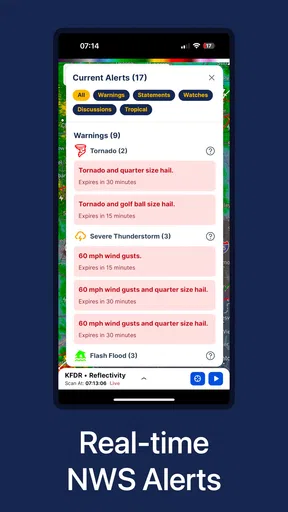
- Real-Time Alerts: This feature is a lifesaver. Get notified about sudden weather changes or alerts that need your attention. It’s like having a heads-up before weather chaos hits.
- Customizable Widgets: Spice up your home screen with widgets that provide live updates. You can customize them to match your aesthetic, which is a nice touch.
- Detailed Forecasts: Dive deep into detailed forecasts that cover everything from temperature swings to humidity levels. It’s perfect for those who like to plan their day around the weather.
Another feature that caught my eye is the integration with social media. You can easily share weather updates with friends, which is great for planning group outings or just having a laugh about the unexpected snow in April.
The Social Element
Let's talk about the social aspect of WeatherWise.app. I found it pretty cool how you can connect with other users and share your own weather experiences. Whether it's a stunning sunrise or a freak hailstorm, sharing these moments adds a communal feel to the app. Plus, seeing weather updates from friends around the world is a fun way to stay connected and maybe even a conversation starter.
My Personal Take
Alright, I've got to say, I've tried my fair share of weather apps, but WeatherWise.app has genuinely impressed me. It's not just about the weather; it's about making the experience enjoyable and engaging. The app strikes a nice balance between functionality and fun, which is something I didn’t know I needed until now.
So, whether you’re a weather geek or just someone who likes to stay dry, give WeatherWise.app a shot. It just might become your new favorite weather buddy. Trust me, your future self will thank you when you’re prepared for whatever Mother Nature throws your way.
Pros
- Accurate weather updates in real-time.
- User-friendly interface with easy navigation.
- Customizable alerts for severe weather.
- Detailed forecasts for multiple locations.
- Minimal battery consumption.
Cons
- Occasional ads can be intrusive.
- Limited free features; subscription needed.
- Requires internet for most functionalities.
- Some users report slow loading times.
- Widgets lack customization options.
FAQs for WeatherWise.app
What features does WeatherWise.app offer to users?
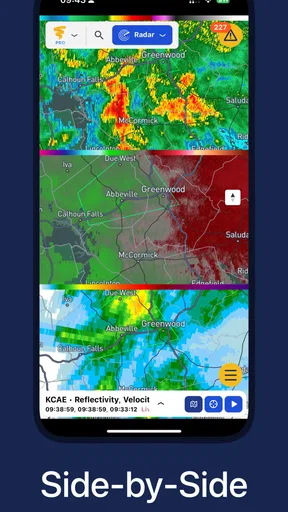
WeatherWise.app provides real-time weather updates, detailed forecasts, and interactive maps. Users can access hourly and weekly forecasts, receive severe weather alerts, and view radar animations. Additionally, the app includes customizable widgets for quick access to weather updates directly from the home screen.
Is WeatherWise.app available for both Android and iOS devices?
Yes, WeatherWise.app is available for download on both Android and iOS platforms. Users can find the app on the Google Play Store for Android devices and the Apple App Store for iOS devices, ensuring compatibility across a wide range of smartphones and tablets.
Does WeatherWise.app require an internet connection to function?
WeatherWise.app requires an internet connection for accessing real-time updates and forecast data. However, the app saves recent weather information, allowing users to access the latest updates they viewed when offline. For the most accurate and current data, maintaining an internet connection is recommended.
Are there advertisements in WeatherWise.app, and is there a way to remove them?
WeatherWise.app includes advertisements in its free version, which help support the development and maintenance of the app. Users can opt for a premium subscription that removes ads and may provide additional features, offering an enhanced, uninterrupted experience.
How does WeatherWise.app ensure the accuracy of its weather forecasts?
WeatherWise.app sources data from reputable meteorological services and utilizes advanced algorithms to deliver accurate and reliable forecasts. The app continuously updates its data to reflect the latest weather patterns, ensuring users receive precise and timely information tailored to their location.


